
The Ultimate Guide to Bash PS1 Customization (+ Free Generator Tool) 🚀
Customizing your Bash prompt (PS1) is one of those things that sounds simple… until you actually try to do it.
Colors break. Escape sequences look like black magic. Alignment randomly shifts. And every small change turns into hours of trial-and-error frustration.
I got tired of that, so I built a tool to fix it.
👉 Try the Bash Prompt Generator 👉 View on GitHub
🧐 What exactly is PS1?
PS1 (Prompt String 1) is the primary environment variable that defines what your terminal prompt looks like every time you press Enter.
A basic default looks like this:
PS1="\u@\h:\w$ "
Which translates to:
username@hostname:~/current/path$
🛠 Common PS1 Elements
Here are the building blocks you’ll use most often:
| Code | Meaning |
|---|---|
\u |
Current Username |
\h |
Hostname (up to the first dot) |
\w |
Full Current Directory path |
\W |
Only the current folder name |
\t |
Current Time (HH:MM:SS) |
\$ |
Displays $ (or # if you are root) |
🎨 Adding Colors (Where it gets painful)
Adding a bit of color seems easy, but the syntax is notoriously unfriendly. Look at this example for a simple green and blue prompt:
PS1="\[\e[32m\]\u@\h \[\e[34m\]\w \[\e[0m\]\$ "
Why this sucks:
- Unreadable: It looks like someone sneezed on the keyboard.
- Fragile: One missing bracket
[or]and your line wrapping breaks globally. - Hard to Debug: It requires exact ANSI escape sequences that nobody wants to memorize.
🌿 Adding the Git Branch
Want to see which branch you're on without typing git status every 5 seconds? Usually, you'd add a function like this to your .bashrc:
parse_git_branch() {
  git branch 2>/dev/null | grep '*' | sed 's/* //'
}

PS1="\u@\h \w \\((parse_git_branch) \) "
Now, try combining that with colors. Suddenly, your PS1 string is a 200-character monster that is impossible to maintain. Spacing breaks, formatting glitches, and your productivity drops while you're busy "fixing the UI."
💡 A Better Way: The Visual Generator
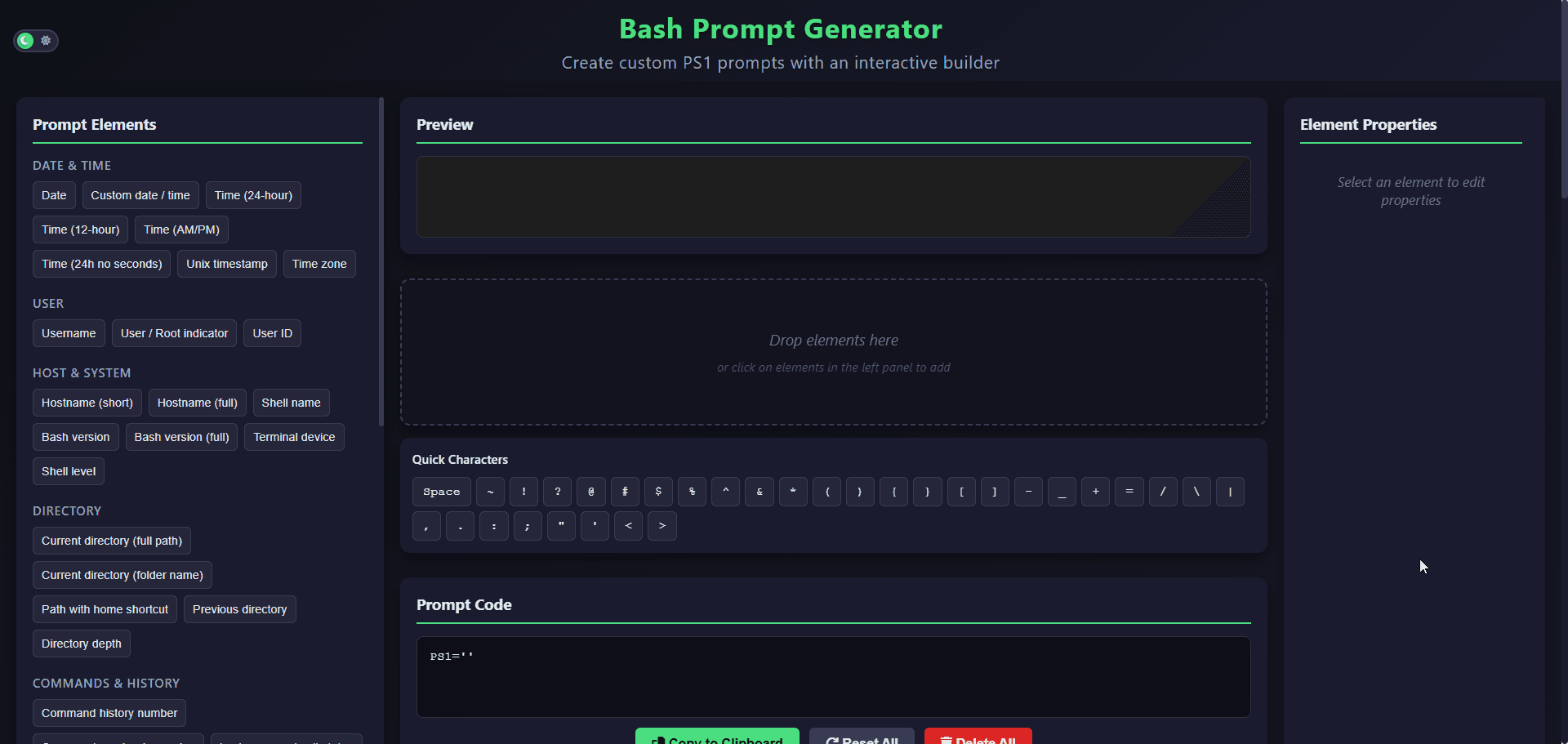
I built the Bash Prompt Generator to remove this friction. Instead of low-level string hacking, you get a clean interface to design your perfect workflow.
✨ Key Features:
- Visual Builder: Drag and drop elements or toggle them on/off.
- Color Selection: Pick colors visually without touching escape codes.
- Git Support: Seamlessly integrate branch names.
- Instant Preview: See exactly how it looks before you touch your config.
- Ready-to-Copy: Just copy the result and paste it into your
.bashrc.
🚀 Example Workflow:
- Open the Generator.
- Click the segments you want (User, Path, Git).
- Pick your favorite colors.
- Copy the generated code.
- Paste it into your
~/.bashrcfile. - Run
source ~/.bashrc. Done.
🛠 Open Source & Feedback
This tool is open-source because I want it to be useful for the whole community. If you find a bug or have a feature request, feel free to open an issue or a PR!
Planned improvements:
- More prompt segments (Exit codes, Python VENV).
- Zsh support.
- Theming presets.
Check out the code here:
👉 GitHub: bash-prompt-generator
Conclusion
Customizing your terminal should be fun, not a chore. Your prompt is your dashboard—make it work for you!
Give the tool a try and let me know what you think in the comments! What's the one thing you can't live without in your terminal prompt? 👇
If you found this helpful, consider starring the repo on GitHub! ⭐